Best AI Tools for Vertical Video in 2026: 16 Picks by Job
By AI Workflows Team · September 6, 2026 · Updated September 9, 2026 · 13 min read
Sixteen AI tools for vertical video in 2026, organised by the job each one does: clipping long video, script-to-video, raw generation, avatars and finishing. With real free-tier limits, our editorial scores, and the one model that leaves OpenAI's API on 24 September 2026.
TL;DR: pick by the job, not the brand
| The job | Our pick | Free tier | Score |
|---|---|---|---|
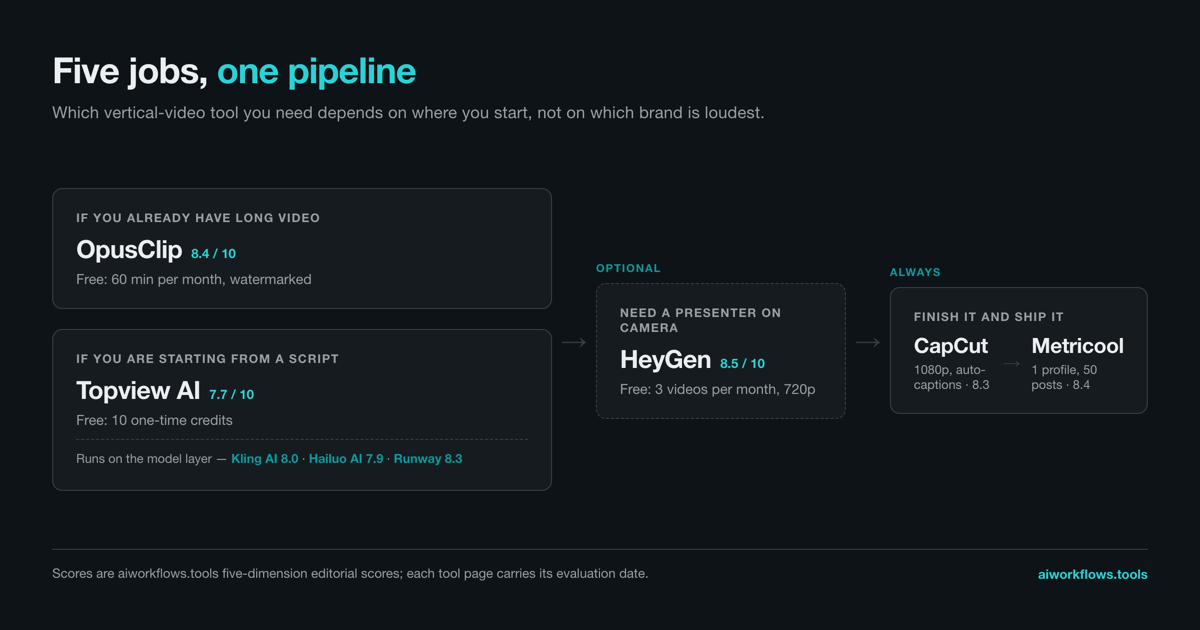
| Cut a long video into vertical clips | OpusClip | 60 min/month, watermarked | 8.4 |
| Generate a vertical video from a script | Topview AI | 10 one-time credits | 7.7 |
| Generate a serialised vertical story | MagicLight | Monthly credit allowance, no card | 7.6 |
| Generate the raw clips | Kling AI | 5 credits/month | 8.0 |
| Put a person on camera | HeyGen | 3 videos/month, 720p | 8.5 |
| Caption, trim, and export 9:16 | CapCut | 1080p export, auto-captions | 8.3 |
| Schedule and measure | Metricool | 1 profile, 50 posts/month | 8.4 |
Scores are our five-dimension editorial scores, each with its evaluation date printed on the tool's page. Run these together and you have the Viral TikTok/Shorts Automation workflow end to end.
Vertical video is not "video editing, but taller"
Search for AI video tools and you get the same ten listicles about AI video editors. They answer a different question. Edit a horizontal video and you are working the timeline. Post a vertical one and you are working the first second, the safe zone, and the caption, because your viewer is holding the phone in one hand with their thumb already moving.
You feel that difference the moment you open a general editor. It will export 9:16 without complaint and leave your subject's head cropped at the top and the caption sitting under the platform's own UI. The tools below were built with the frame in mind, or at least handle it without a fight.
One number worth having before you start: YouTube's own help documentation puts Shorts at up to 3 minutes long, with a maximum upload resolution of 1080p. That is the ceiling you are working under. Most of what follows is about getting something watchable inside it.
Three constraints do most of the damage if you ignore them:
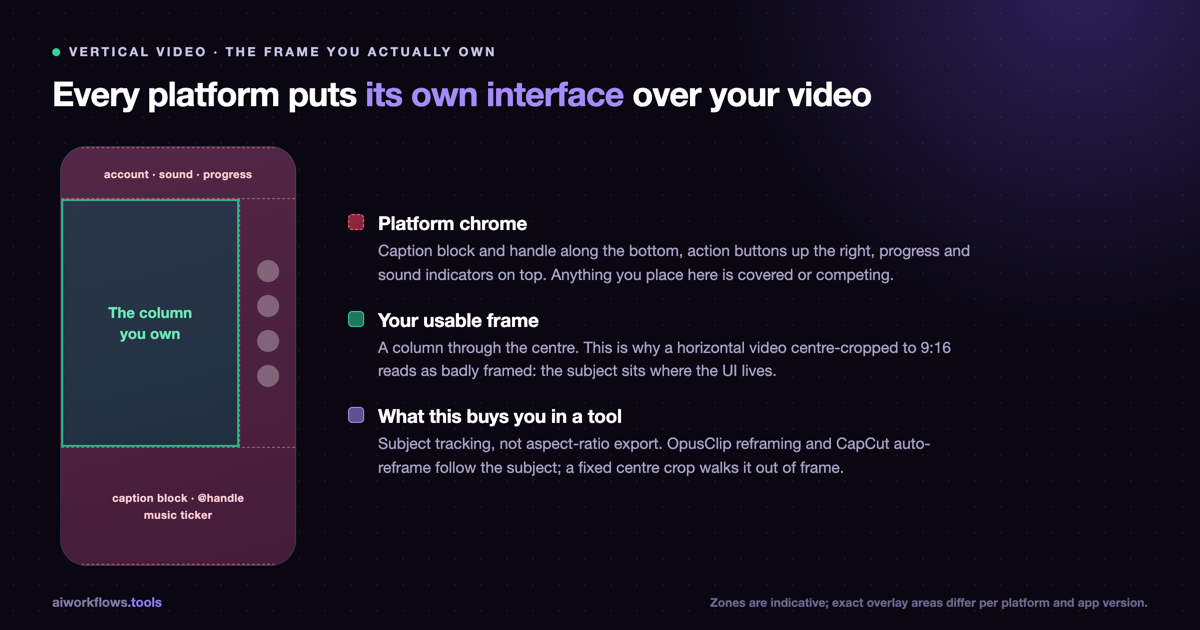
The middle of the frame is the only part you own. Every vertical platform puts its own interface over the video: a caption block and account handle along the bottom, action buttons up the right side, and on some surfaces a progress bar underneath everything. Anything you place there is either covered or competing. In practice that leaves a column through the centre, and it is why a horizontal video centre-cropped to 9:16 so often looks like it was framed by someone who had never seen a phone.
Captions are not an accessibility afterthought. A large share of short-form viewing happens muted, which makes burned-in captions the primary text layer rather than a secondary one. This is the single strongest argument for finishing in a tool that generates them automatically instead of adding them by hand.
The first second decides the rest. Short-form feeds are scroll-first, so the opening frame competes against a thumb that is already in motion. This is a scripting problem more than a tooling one, but it does change which tool you want: anything that makes it cheap to regenerate the opening three seconds twenty times is worth more than anything that makes the middle 30 seconds prettier.
So this guide follows the five jobs in a vertical pipeline rather than the brands, because almost nobody uses one tool for all of it.
Job 1: Turn footage you already have into vertical clips
If you have a podcast, a webinar, or a long YouTube upload, this is the cheapest win available. You are not generating anything. You are finding the good 40 seconds and reframing it.
OpusClip
OpusClip is the default here and has been for a while. You give it a long video, it finds the segments most likely to work standalone, reframes to 9:16 with subject tracking, and burns in captions.
The free plan gives 60 minutes of AI clipping per month with a watermark. Starter is $15/month for 3 hours without the watermark; Pro at $29/month for 10 hours adds auto-publishing. For most people testing whether short-form is worth their time, 60 free minutes is enough to find out.
Where it struggles: it is scoring for virality signals, not for whether the clip makes sense on its own. Expect to reject a good half of what it hands you.
Descript
Descript comes at the same job from the transcript side. You edit the text, the video follows. For dialogue-heavy source material that beats scrubbing a timeline.
Free gives you 1 hour of transcription with watermarked video exports. Creator is $24/month billed annually for 10 hours of transcription per month.
Pick Descript over OpusClip when the words matter more than the pacing: interviews, explainers, anything where you need to cut a specific sentence rather than a vibe.
Job 2: Generate a vertical video from a script
Here you have no footage. You have an idea, or a script, and you want something shootable-looking out the other end.
Topview AI
Topview AI is built around a Drama Studio aimed at 1–5 minute vertical shorts, with a storyboard-to-video canvas rather than a single prompt box. It also bundles TikTok Ad Library insights, which is unusual and useful if you are making anything advertising-adjacent.
Free tier is thin: a one-time 10 credits and preview-only Ad Library access. Pro is $29/month. As of September 2026 its published model list runs Seedance 2.5, Google Veo 3.1 (which Google's own API still ships as veo-3.1-generate-preview, a preview model rather than a stable release), MiniMax H3, Wan 3.0, Nano Banana 2, Seedream 5.0 and Kling 2.6. Two of those are worth a second look before you commit: the preview label on Veo means output consistency is not guaranteed, and Kling 2.6 is the previous generation, one step behind the Kling 3.0 that Kling's own platform now offers.
MagicLight
MagicLight goes after the hardest problem in the category: keeping a character looking like the same character across scenes. It handles multi-scene narratives up to 50 minutes using story templates, which makes it the pick for serialised vertical content rather than one-offs.
Free to start with a monthly credit allowance and no card required. Paid credits run roughly $0.027–$0.094 per 100 credits depending on tier.
Output fidelity trails the dedicated single-clip generators, and long plots still drift. But if you are making episode 7 of something and episode 1 established a face, nothing else in this list handles that as well. It sits at step 2 of our AI Short Drama Production workflow for that reason.
Pippit AI
Pippit AI is ByteDance and CapCut's creative agent, pointed at marketing rather than storytelling. Feed it a link, a file, or media and it produces TikTok-ready shorts, with digital avatars and an image agent attached.
The free plan is the most generous in this section: 150 credits refreshed weekly, no card, plus two AI features. Paid plans are billed yearly starting around $200.
Job 3: The model layer
Jobs 1 and 2 are products. This is the layer underneath: raw generation, where you are buying seconds of video rather than a workflow.
Kling AI
Kling AI offers Kling 3.0, 3.0 Turbo, 3.0 Omni, 2.6 and O1. 5 free credits per month, with Kling 3.0 in early access for Ultra subscribers and API availability since February 2026.
Hailuo AI
Hailuo AI runs MiniMax Hailuo 2.3 and 2.3 Fast. The free plan is workable: roughly 500 credits on sign-up plus daily login bonuses, up to three queued tasks, watermarked. Standard is $9.99/month for 1,000 credits without the watermark, which is the cheapest serious entry point in this whole guide.
Runway
Runway remains the quality benchmark for cinematic work, now on Gen-4.5. The free plan is a one-time 125 credits with no monthly refresh, which buys you an evaluation and not much else. Standard starts at $15/month for 625 credits, around 52 seconds of Gen-4.5.
Luma Dream Machine
Luma Dream Machine runs Ray3.14, Ray3 and DM 1.6. 8 free draft videos per month, watermarked and non-commercial. Lite is $7.99/month; Plus at $23.99/month adds commercial use.
Job 4: Put a person on camera without a camera
Talking-head vertical is its own category, and it converts differently from generated b-roll. A face holds attention through a 45-second explainer in a way that stock motion does not.
HeyGen
HeyGen is the strongest all-rounder: 3 videos per month up to 3 minutes each on the free plan, 720p export, 500+ stock avatars, 30+ languages. Creator starts at $29/month. It runs Avatar V, Avatar IV and Photo Avatar, and sits at step 2 of our AI Avatar Video Marketing workflow.
Synthesia
Synthesia is the enterprise-leaning option, running Express-2 and Synthesia 3.0. Free gives 10 minutes per month with 9 stock avatars. Starter is $29/month monthly or $18/month annual; Creator is $89/month monthly or $64/month annual.
Choose Synthesia for training and internal comms where consistency and approvals matter. Choose HeyGen for social, where you want more avatars and a more forgiving free tier.
D-ID
D-ID is narrower: Video Studio and Visual AI agents, with a watermarked free trial and 1080p on paid plans. Worth a look for interactive or agent-driven video, less so for straight production.
Job 5: Finish it and ship it
CapCut
CapCut is where most vertical video actually gets finished, and the free tier is the reason: 1080p export, auto-captions, background removal, and thousands of templates at no cost. It closes out three of our video workflows.
Filmora
Filmora is the desktop alternative when you want a real timeline. Free download with limited AI features; a perpetual licence at around $69 or an annual plan around $49.99 unlocks the AI tools including Smart Short Clips.
ElevenLabs
ElevenLabs handles voice, running Eleven v3, Turbo v2.5, Multilingual v2 and Flash v2. 10,000 credits per month free, Starter $5/month for 30k. For vertical, the thing that matters is that a synthetic read at 1.1x still sounds like a person; v3 mostly clears that bar.
Metricool
Metricool closes the loop. The free forever plan covers 1 profile and 50 scheduled posts per month, which is enough to run a single channel properly before you pay for anything.
The model underneath matters more than the interface
Most of the tools in Job 2 are not generating video themselves. They are orchestration layers over the same handful of models, which means two things: the output quality moves when the underlying model moves, and the model list on a vendor's homepage is a real spec, not marketing.
It also means those lists go stale, and one is about to go stale on a known date.
Sora 2 is retired. According to OpenAI's own model documentation, the Sora web and app experience stopped on 2026-04-26, and the Videos API along with sora-2 and sora-2-pro are removed from the API on 2026-09-24, with no replacement listed. We verified that against OpenAI's docs on 2026-08-23.
When we checked the three script-to-video tools above on 2026-09-06, MagicLight and Pippit were both still advertising Sora 2 on their own sites — a model OpenAI had already pulled from its web and app experience on 2026-04-26, and had scheduled for removal from the API on 2026-09-24. Neither vendor was being dishonest — OpenAI's published timetable runs that API to 2026-09-24. But if Sora 2 access is part of why you pick one of these tools, ask the vendor what replaces it, because as of our last check neither had said.
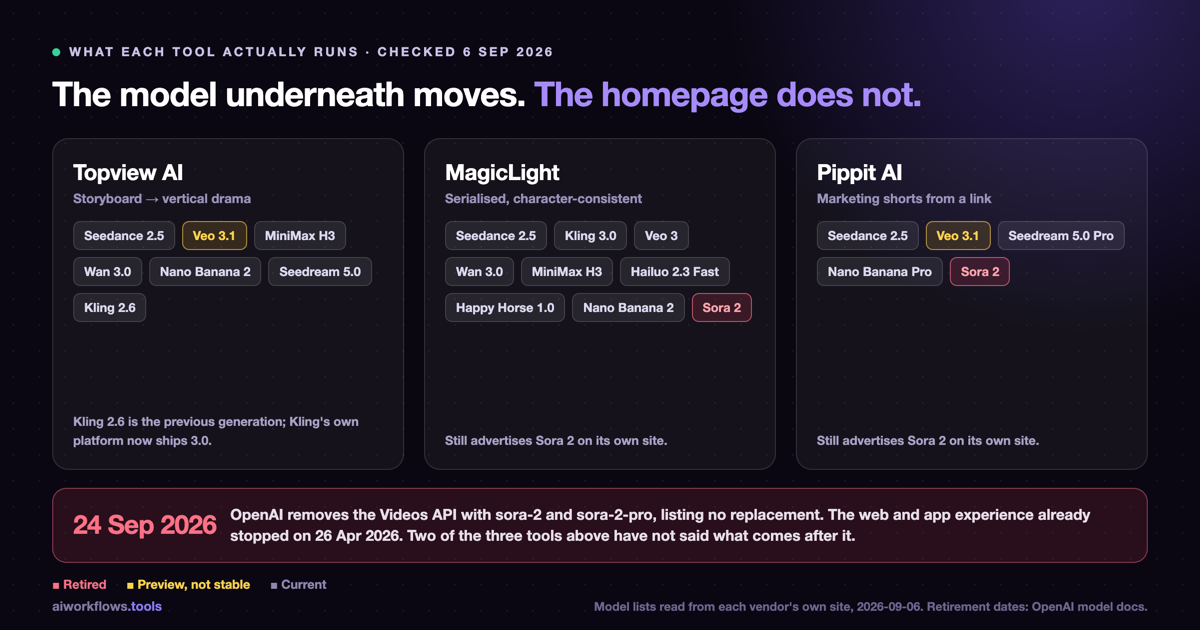
This is the boring, unglamorous thing that decides whether a tool guide is worth reading six weeks after it was published. We list the models each tool publishes, with the date we checked, and we leave the retired ones out.
The full comparison
| Tool | Best for | Free tier | Entry paid | Score |
|---|---|---|---|---|
| OpusClip | Long video → vertical clips | 60 min/mo, watermarked | $15/mo | 8.4 |
| Descript | Transcript-first editing | 1 hr transcription | $24/mo annual | 8.4 |
| Topview AI | Storyboard → vertical drama | 10 one-time credits | $29/mo | 7.7 |
| MagicLight | Serialised, character-consistent | Monthly credits, no card | ~$0.027/100 credits | 7.6 |
| Pippit AI | Marketing shorts from a link | 150 credits weekly | ~$200/yr | 8.3 |
| Kling AI | Raw generation | 5 credits/mo | Tiered | 8.0 |
| Hailuo AI | Cheapest serious generation | ~500 credits + daily | $9.99/mo | 7.9 |
| Runway | Cinematic quality | 125 one-time credits | $15/mo | 8.3 |
| Luma Dream Machine | Fast drafts | 8 drafts/mo | $7.99/mo | 8.1 |
| HeyGen | Social talking-head | 3 videos/mo, 720p | $29/mo | 8.5 |
| Synthesia | Training and internal comms | 10 min/mo | $18/mo annual | 8.5 |
| D-ID | Interactive avatars | Trial, watermarked | Tiered | 8.0 |
| CapCut | Finishing and captions | 1080p, auto-captions | Pro tier | 8.3 |
| Filmora | Desktop timeline | Limited AI | ~$49.99/yr | 8.1 |
| ElevenLabs | Voice | 10k credits/mo | $5/mo | 8.5 |
| Metricool | Scheduling and analytics | 1 profile, 50 posts | Tiered | 8.4 |
Every score is our own five-dimension editorial evaluation, and every tool page shows the date it was last evaluated. Several in this table were last evaluated in mid-2026; treat the scores as of that date rather than as of today.
What we would actually pick
Three stacks, depending on what you already have.
You have long video already. OpusClip free tier plus CapCut free tier. Total cost: nothing. This answers whether short-form works for your material before you spend anything, and it takes an afternoon.
You have a script and no footage. Hailuo AI at $9.99/month for generation, CapCut for finishing, ElevenLabs free tier for voice. Under $10/month for a working pipeline. Add Topview only when you need storyboard-level control rather than clip-level.
You are building a series. MagicLight for character continuity, ElevenLabs for consistent character voices, CapCut to finish. This is the only stack here where the character-consistency problem is actually solved rather than worked around.
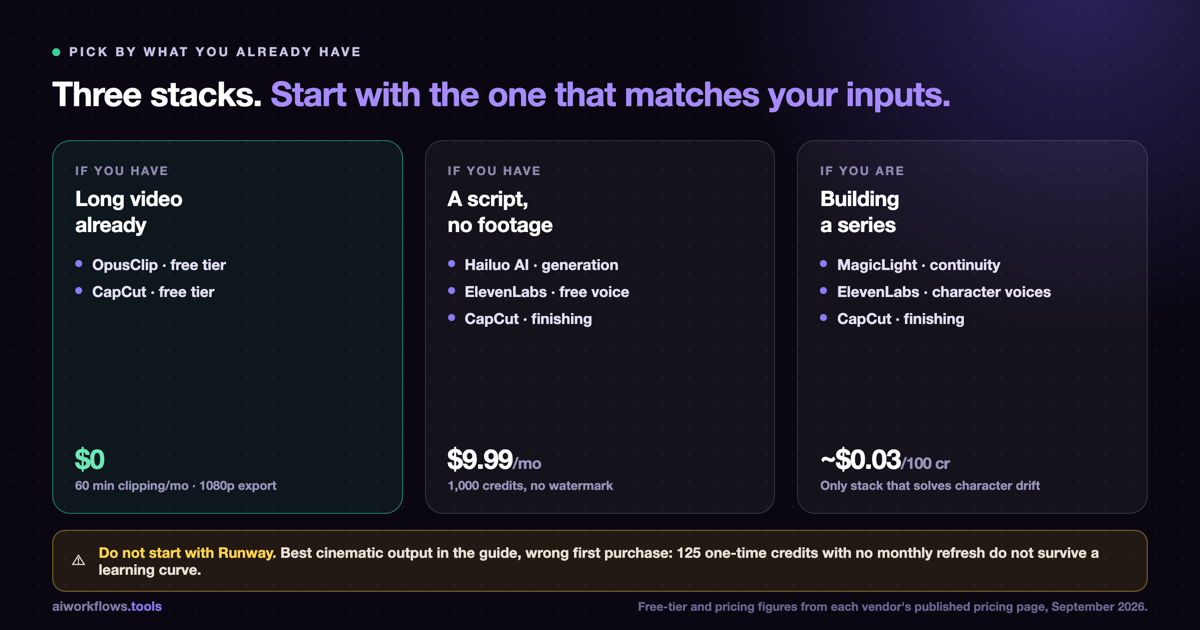
What we would not do: pay for Runway as your first tool. It is the best cinematic output in this list and the wrong place to start, because 125 one-time credits do not survive a learning curve.
A first run, in about 90 minutes
If you have never shipped a vertical video, the failure mode is not picking the wrong tool. It is spending three weeks comparing tools and shipping nothing. This is the shortest path to one finished, posted video, at zero cost.
Minutes 0–15. Get source material. If you have a long video, upload it to OpusClip and let it run. If you do not, write eight sentences about something you know well and generate a voice track in ElevenLabs' free tier. Pick a topic you already know cold. This run is about the pipeline, not the writing.
Minutes 15–35. Get a rough cut. From OpusClip, pick the clip with the cleanest opening line rather than the highest score. If you generated audio instead, take the free tier of Hailuo AI or Luma Dream Machine and generate four or five short clips to lay under it.
Minutes 35–70. Finish it in CapCut. Drop the clip on a 9:16 timeline. Turn on auto-captions and then read them, because names and jargon come through wrong often enough to matter. Pull every caption and title into the middle band of the frame. Trim the front until the video opens on the most interesting thing in it, which normally means deleting your first sentence.
Minutes 70–90. Post it and write down the number. Post natively rather than through a scheduler for this first one. Come back in 48 hours and record two figures: how many people watched past three seconds, and how many watched to the end.
Those two numbers tell you more than any comparison table, this one included. If the three-second number is bad, your problem is hooks and no generation tool will fix it. If the three-second number is fine and the completion number collapses, your problem is pacing, which is an editing fix. Only once both numbers are reasonable does a better generation tool change anything, and by then you will know which step is hurting and therefore which tool you need.
Use this in a workflow
A tool list is a shopping list. These are the assembled pipelines:
- Viral TikTok/Shorts Automation. Trend discovery, scripting, generation, auto-editing, and posting. The direct pipeline for everything in this guide.
- AI Short Drama Production. Episode scripting, vertical storyboarding, generation, multi-character dubbing, and hook editing. Use this when the output is serialised.
- AI Avatar Video Marketing. Script, avatar generation, b-roll, voice, and distribution, for talking-head vertical.
Frequently asked questions
What is the best free AI tool for vertical video?
For repurposing existing footage, OpusClip's 60 free minutes per month is the most useful free tier in the category. For finishing, CapCut gives you 1080p export and auto-captions at no cost, which is more than most paid editors offered two years ago. For generation from scratch, Pippit AI's 150 weekly credits refresh, which beats the one-time credit grants most competitors offer.
Do I need a separate tool for 9:16, or can I just crop?
You can crop, and for static shots it is fine. It stops being fine as soon as the subject moves, because a fixed centre crop will walk your subject out of frame. Tools with subject tracking, like OpusClip's reframing and CapCut's auto-reframe, follow the subject instead. The tracking is what you are paying for, and the aspect ratio is the easy part.
How long can a vertical video be?
Platform-dependent. YouTube's help documentation puts Shorts at up to 3 minutes with a maximum upload resolution of 1080p. Topview AI's Drama Studio targets 1–5 minutes, and MagicLight handles multi-scene narratives up to 50 minutes, well past what any short-form feed takes as a single upload. That length is for serialised content you then cut into episodes.
Which AI video tools are affected by Sora 2 being retired?
Per OpenAI's model documentation, sora-2 and sora-2-pro leave the API on 2026-09-24 with no replacement listed. As of 2026-09-06, MagicLight and Pippit AI both still list the retired Sora 2 among their available models on their own sites, and neither has published what comes after it. If access to the retired Sora 2 is part of why you are choosing a tool, ask the vendor before paying for a year.
Is a paid plan worth it for a first vertical video?
No. Every category in this guide has a free tier capable of producing one finished vertical video. Produce one, post it, and look at the retention graph before you spend anything. The most common mistake here is buying a year of a generation tool before finding out whether the format suits the material.
Sources & references
- YouTube Help: Get started creating YouTube Shorts. Shorts length and maximum upload resolution.
- OpenAI Models documentation. Dates on which Sora 2 is retired, and what replaces it, verified 2026-08-23.
- Vendor model lists for MagicLight, Topview AI and Pippit AI were read directly from each vendor's own site on 2026-09-06.
- Pricing and free-tier figures are from each vendor's published pricing pages. Scores are AI Workflows' five-dimension editorial evaluations; each tool page prints its own evaluation date.