Claude Managed Agents: The Complete Developer Guide (2026)
By AI Workflows Team · April 10, 2026 · 13 min read
Claude Managed Agents (public beta, April 2026) is Anthropic's fully-managed infrastructure for autonomous AI agents. Learn the architecture, quickstart code, pricing breakdown, and honest vendor lock-in analysis.
Claude Managed Agents: The Complete Developer Guide (2026)
TL;DR: Claude Managed Agents (public beta, April 8, 2026) is Anthropic's fully-managed infrastructure for running autonomous AI agents. Instead of building your own sandbox, agent loop, and session state, you define an Agent config, spin up an Environment, and start Sessions — Claude handles the rest. Pricing: $0.08/session-hour + standard token costs. Best for long-running, production agent workloads.
What Is Claude Managed Agents?
On April 8, 2026, Anthropic launched something that isn't a new model — it's a new way to run Claude.
Claude Managed Agents is a hosted agent infrastructure platform. You define your agent's configuration (model, system prompt, tools, MCP servers), set up a cloud environment pre-loaded with whatever packages you need, and start sessions. Claude runs autonomously inside a sandboxed container — reading files, executing code, browsing the web, completing multi-step tasks — while your application streams results in real time.
The operative word is managed. You don't write the agent loop. You don't provision sandboxes. You don't wire up error recovery, session checkpointing, or credential vaulting. Anthropic handles all of that. Your job is to define what the agent should do and feed it tasks.
According to Anthropic's internal benchmarks, structured file generation tasks showed a 10-point improvement in task success rates compared to standard Claude API prompting. Five named enterprise customers — Notion, Rakuten, Asana, Vibecode, and Sentry — shipped production workloads before the public beta even launched.
Claude Agent SDK vs. Claude Managed Agents: Which Do You Need?
This is the question developers ask first, and almost no existing article answers it directly. Anthropic offers two distinct ways to run Claude as an autonomous agent:
| Claude Agent SDK (local) | Claude Managed Agents (hosted) | |
|---|---|---|
| What it is | Library to build your own agent loop | Fully managed hosted infrastructure |
| Runs where | Your own server / machine | Anthropic's cloud containers |
| Infrastructure | You build and maintain | Anthropic provides and maintains |
| Agent loop | You write it | Pre-built and optimized |
| Sandboxing | You implement or choose | Built-in, secure by default |
| Session state | You manage | Persisted server-side |
| Multi-model | Yes — Claude, GPT, local models | Claude only |
| Pricing | Token cost only | $0.08/session-hour + tokens |
| Vendor lock-in | Low | High (Anthropic infra only) |
| Best for | Custom control, multi-model routing | Long-running tasks, minimal infra |
Use the Claude Agent SDK when:
- You need to route between multiple AI providers
- You want fine-grained control over the agent loop (the SDK is the same engine powering Claude Code)
- You have existing infrastructure and just need the intelligence layer
- Self-hosted or on-prem deployment is a requirement
Use Claude Managed Agents when:
- You want to ship an agent-powered feature in days, not months
- Your tasks run for minutes to hours and require persistent state
- You don't want to own sandbox infrastructure or error-recovery logic
- You're building on Anthropic's platform and prioritize speed over portability
How It Works: The Architecture
The Anthropic engineering team published a detailed breakdown of the design philosophy behind Managed Agents. Understanding the architecture helps you use the platform more effectively.
Three Decoupled Components
Every Managed Agents session is composed of three independently managed pieces:
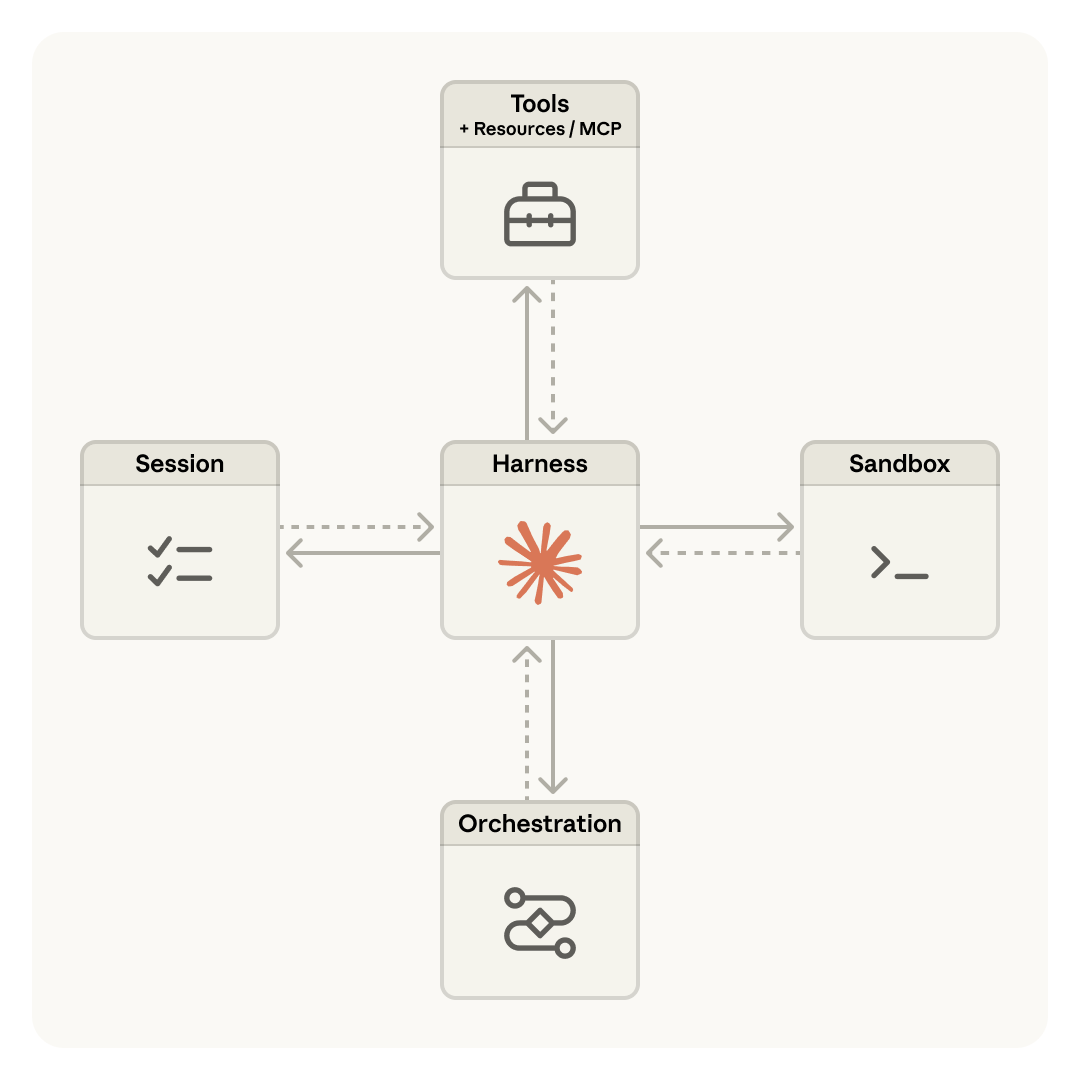
- Session — An append-only event log. The source of truth for everything that has happened in a task.
- Harness — The stateless loop that calls Claude, routes tool calls, and manages execution flow.
- Sandbox — The isolated container where code actually runs.
The key insight: these three components can fail and restart independently. If the harness crashes mid-task, a new harness picks up the session log and resumes. If the sandbox gets killed, the session survives. This is what makes long-running agents reliable in production.
Anthropic borrowed a framing from DevOps to describe the old approach: "pets vs. cattle." Early agent designs coupled everything in a single container — a precious pet you couldn't afford to lose. The decoupled architecture treats each component as interchangeable cattle: disposable, replaceable, and far more resilient at scale.
The Session Is Not Claude's Context Window
This is a distinction that matters in practice:
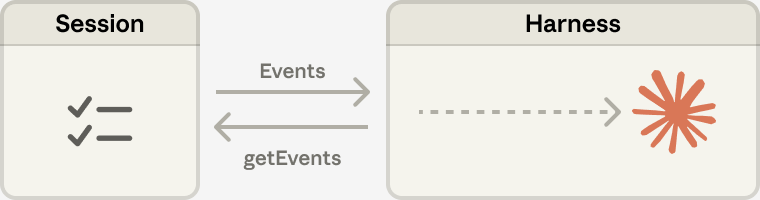
The session log stores every event that has ever occurred in a task. Claude's context window is a selective view of that log — the harness uses getEvents() to retrieve what's relevant and passes it to Claude. This means:
- Sessions can run for hours without hitting context limits (the harness handles compaction automatically)
- You never have to make irreversible deletion decisions mid-task
- Historical events remain queryable even after they've left Claude's active window
Many Brains, Many Hands
The decoupled design also enables horizontal scaling:
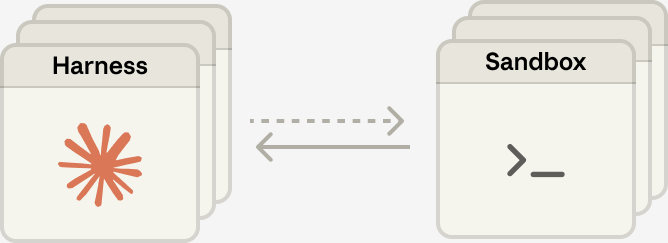
Harnesses (brains) are stateless and spin up in milliseconds. Sandboxes (hands) provision lazily — only when a tool call actually requires execution. This lazy provisioning is why Anthropic reports a ~60% reduction in p50 time-to-first-token and over 90% reduction in p95 TTFT compared to their earlier coupled designs.
Core Concepts
| Concept | What It Is |
|---|---|
| Agent | Reusable, versioned config: model + system prompt + tools + MCP servers |
| Environment | Container template: pre-installed packages + networking rules |
| Session | A running agent instance in an environment; maintains conversation history |
| Events | Messages between your app and the agent: user turns, tool results, status updates |
Agents and Environments are defined once and reused. Sessions are ephemeral instances — each task gets its own isolated session with a dedicated container.
Quickstart: Your First Agent in 5 Minutes
Prerequisites
- An Anthropic API key (all accounts have Managed Agents access by default)
- Python ≥ 3.8 or Node.js ≥ 18
Install the SDK
# Python
pip install anthropic

# TypeScript / Node.js
npm install @anthropic-ai/sdk
Or install the ant CLI for interactive management:
# macOS
brew install anthropics/tap/ant
xattr -d com.apple.quarantine "$(brew --prefix)/bin/ant"
ant --version
Step 1 — Create an Agent
An agent is a reusable configuration. Create it once and reference its ID in every session.
from anthropic import Anthropic

client = Anthropic()

agent = client.beta.agents.create(
    name="Coding Assistant",
    model="claude-sonnet-4-6",
    system="You are a helpful coding assistant. Write clean, well-documented code.",
    tools=[
        {"type": "agent_toolset_20260401"},  # Enables bash, file ops, web search
    ],
)

print(f"Agent ID: {agent.id}, version: {agent.version}")
The agent_toolset_20260401 type grants access to all built-in tools: Bash, file read/write/edit/glob/grep, web search, and web fetch. You can also selectively specify individual tools or connect MCP servers.
TypeScript equivalent:
import Anthropic from "@anthropic-ai/sdk";

const client = new Anthropic();

const agent = await client.beta.agents.create({
  name: "Coding Assistant",
  model: "claude-sonnet-4-6",
  system: "You are a helpful coding assistant. Write clean, well-documented code.",
  tools: [{ type: "agent_toolset_20260401" }],
});

console.log(`Agent ID: ${agent.id}, version: ${agent.version}`);
Step 2 — Create an Environment
Environments define the cloud container your agent runs in. Specify packages and networking:
environment = client.beta.environments.create(
    name="quickstart-env",
    config={
        "type": "cloud",
        "networking": {"type": "unrestricted"},  # Full outbound internet access
    },
)
For data science or backend tasks, pre-install any packages:
environment = client.beta.environments.create(
    name="data-analysis",
    config={
        "type": "cloud",
        "packages": {
            "pip": ["pandas", "numpy", "scikit-learn"],
            "npm": ["express"],
        },
        "networking": {"type": "unrestricted"},
    },
)
Supported package managers: pip, npm, apt, cargo, gem, go.
For stricter security, use limited networking with an allowlist:
config = {
    "type": "cloud",
    "networking": {
        "type": "limited",
        "allowed_hosts": ["api.example.com"],
        "allow_mcp_servers": True,
        "allow_package_managers": True,
    },
}
Step 3 — Start a Session
session = client.beta.sessions.create(
    agent=agent.id,
    environment_id=environment.id,
    title="Fibonacci generator task",
)

print(f"Session ID: {session.id}")
Step 4 — Send a Message and Stream the Response
with client.beta.sessions.events.stream(session.id) as stream:
    # Send user message after stream opens
    client.beta.sessions.events.send(
        session.id,
        events=[{
            "type": "user.message",
            "content": [{
                "type": "text",
                "text": "Create a Python script that generates the first 20 Fibonacci numbers and saves them to fibonacci.txt",
            }],
        }],
    )

    # Process streaming events
    for event in stream:
        match event.type:
            case "agent.message":
                for block in event.content:
                    print(block.text, end="")
            case "agent.tool_use":
                print(f"\n[Tool: {event.name}]")
            case "session.status_idle":
                print("\n\nDone.")
                break
The agent will write the script, execute it in the sandbox, verify the output, and report completion — all autonomously. You stream results in real time via SSE.
TypeScript equivalent:
const stream = await client.beta.sessions.events.stream(session.id);

await client.beta.sessions.events.send(session.id, {
  events: [{
    type: "user.message",
    content: [{
      type: "text",
      text: "Create a Python script that generates the first 20 Fibonacci numbers and saves them to fibonacci.txt",
    }],
  }],
});

for await (const event of stream) {
  if (event.type === "agent.message") {
    for (const block of event.content) process.stdout.write(block.text);
  } else if (event.type === "agent.tool_use") {
    console.log(`\n[Tool: ${event.name}]`);
  } else if (event.type === "session.status_idle") {
    console.log("\n\nDone.");
    break;
  }
}
Built-in Tools
| Tool | What It Does |
|---|---|
| Bash | Run shell commands in the container |
| File operations | Read, write, edit, glob, grep files |
| Web search | Search the web ($10 / 1,000 searches) |
| Web fetch | Retrieve URL content (token cost only, no surcharge) |
| MCP servers | Connect to any external tool provider |
You can also define custom tools and connect them via the tools array in your agent config. MCP servers work identically to how they work in Claude desktop integrations.
Agent Versioning
One underappreciated feature: agents are versioned automatically. Every update() call produces a new version, and you can pin sessions to specific versions — critical for production stability:
# Update system prompt → creates new version
updated = client.beta.agents.update(
    agent.id,
    version=agent.version,
    system="You are a helpful coding agent. Always write tests.",
)
print(f"New version: {updated.version}")

# Pin a session to the previous version for safe rollout
stable_session = client.beta.sessions.create(
    agent={"type": "agent", "id": agent.id, "version": 1},
    environment_id=environment.id,
)
List all versions to track your agent's evolution:
for v in client.beta.agents.versions.list(agent.id):
    print(f"Version {v.version}: {v.updated_at.isoformat()}")
This versioning model lets you test new system prompts in staging while production sessions run uninterrupted on the previous version — a pattern that matters when sessions are long-running.
Session Statuses and Error Handling
| Status | Meaning |
|---|---|
idle |
Waiting for input. Sessions start here. |
running |
Actively calling Claude or executing tools. |
rescheduling |
Transient error — automatically retrying. |
terminated |
Unrecoverable error — session ended. |
The rescheduling status means the managed infrastructure is handling transient failures on your behalf — you don't need to implement retry logic. Only terminated requires your intervention:
session = client.beta.sessions.retrieve(session_id)
if session.status == "terminated":
    # Check Console for trace; consider starting a new session
    print("Session terminated — see Console for trace data")
Pricing: What Does It Actually Cost?
Claude Managed Agents charges on two dimensions: session runtime + standard token costs.
Session Runtime
$0.08 per session-hour, metered to the millisecond. The meter runs only while status is running — idle, rescheduling, and terminated time is free.
Token Costs
Standard Claude API rates apply inside sessions:
| Model | Input | Output | Cache Read |
|---|---|---|---|
| Claude Opus 4.6 | $5 / MTok | $25 / MTok | $0.50 / MTok |
| Claude Sonnet 4.6 | $3 / MTok | $15 / MTok | $0.30 / MTok |
| Claude Haiku 4.5 | $1 / MTok | $5 / MTok | $0.10 / MTok |
Prompt caching applies inside sessions identically to the Messages API — a significant cost lever for long-running tasks that repeatedly reference the same context.
Web Search
$10 per 1,000 searches. Failed searches are not billed. Web fetch has no surcharge beyond tokens.
Real-World Cost Examples
30-minute Sonnet 4.6 session, 30k input / 10k output tokens:
- Input: $0.09 | Output: $0.15 | Runtime: $0.04 | Total: ~$0.28
1-hour Opus 4.6 session, 50k input / 15k output tokens:
- Input: $0.25 | Output: $0.375 | Runtime: $0.08 | Total: ~$0.71
Same Opus session with prompt caching (40k of 50k input cached):
- Cache read: $0.02 | Uncached: $0.05 | Output: $0.375 | Runtime: $0.08 | Total: ~$0.53
1,000 automated support resolutions (~4k tokens each, Sonnet 4.6):
- Tokens: ~$16 | Runtime (avg 5 min each): ~$6.67 | Total: ~$23
For typical developer automation tasks (15–30 minute sessions, moderate token use), expect $0.10–$0.50 per session with Sonnet 4.6. Batch API discounts do not apply — sessions are stateful and interactive. Volume discounts available via Anthropic enterprise.
Real-World Use Cases
Anthropic's launch customers illustrate the breadth of what Managed Agents enables at production scale:
Notion — Claude handles delegated work directly inside the workspace: engineers shipping code, knowledge workers generating websites and presentations, parallel tasks across teams.
Rakuten — Deployed specialist agents across product, sales, marketing, and finance, integrated with Slack and Microsoft Teams. Each specialist agent ships in approximately one week.
Asana — Built "AI Teammates" that collaborate with humans on tasks inside Asana projects. Advanced features developed significantly faster than alternative approaches.
Vibecode — Powers AI-native app generation; achieved 10× faster infrastructure deployment for end users.
Sentry — Paired a debugging agent with a patch-writing agent: bug flag → reviewable PR fix, automated end-to-end. Deployment timeline dropped from months to weeks.
Beyond enterprise, the developer community is finding compelling use cases for smaller-scale deployments:
- Automated code review pipelines — trigger a review session on every PR, stream results to GitHub comments
- Nightly batch jobs — summarize, analyze, and produce reports from logs and metrics while you sleep
- Research assistants — agents that spend hours gathering, cross-referencing, and synthesizing information
- Document processing — extract, transform, and validate structured data from unstructured inputs at scale
The Honest Vendor Lock-In Assessment
The Hacker News community flagged vendor lock-in as the top concern the day Managed Agents launched (163 points, 72 comments). It deserves a direct answer.
The concern is legitimate. Claude Managed Agents runs exclusively on Anthropic's infrastructure. There is no multi-cloud deployment, no self-hosted option, no bring-your-own-sandbox. You cannot use GPT-4 or a local model as the brain inside a Managed Agents session.
The counter-argument is also legitimate. If you're building on Claude, you already accept model-layer dependency. The infrastructure dependency is additive, not categorically new. And the alternative — spending months building your own sandboxing, session state, error recovery, and credential management — is its own form of lock-in (to your own engineering roadmap).
Mitigation strategies if portability matters:
- Abstract the agent interface — wrap your Managed Agents calls behind a thin adapter layer so the orchestration logic can be replaced without rewriting business logic
- Separate agent config from business logic — keep system prompts and task definitions decoupled from infrastructure calls
- Build egress paths — session event logs are queryable; design your data model so outputs can be consumed regardless of what ran them
- Watch the research preview features — multi-agent, outcomes, and memory are still in preview, meaning their APIs could change; don't build critical production flows on preview features yet
The decision is build vs. buy: if your team's competitive advantage is the product built on top of agents — not the agent infrastructure itself — Managed Agents is a rational trade.
Research Preview Features
Three capabilities are currently in research preview (request access at claude.com/form/claude-managed-agents):
| Feature | What It Does |
|---|---|
| Multi-agent | Agents that spawn and direct sub-agents for parallel workloads |
| Outcomes | Self-evaluation: agents iterate until they meet defined success criteria |
| Memory | Persistent memory across sessions for stateful long-horizon agents |
The outcomes feature is particularly significant — it closes the loop on task completion without requiring human verification of every result. Combined with multi-agent coordination, it opens up workflows where Claude both executes and validates its own work at scale.
Claude Managed Agents vs. Claude Code
Claude Code and Claude Managed Agents share architecture — the Managed Agents harness is related to the same engine that powers Claude Code's agentic loop. But they serve fundamentally different purposes:
| Claude Code | Claude Managed Agents | |
|---|---|---|
| Purpose | Developer productivity tool | Hosted infra for your agent-powered products |
| User | You — in your terminal/IDE | Your users — via your application |
| Deployment | Local or claude.ai | Anthropic cloud containers |
| Primary API | CLI + Agent SDK | REST API / SDK |
For building a product where your users interact with an autonomous agent, Managed Agents is the right foundation. For your own coding workflow, Claude Code is what you want. For a comparison of today's top AI coding tools, see our Best AI Coding Tools 2026 guide.
Getting Started
Claude Managed Agents is in public beta — all Anthropic API accounts have access by default. The SDK sets the required beta header automatically when you use client.beta.* endpoints.
If you prefer manual HTTP calls, add this header to every request:
anthropic-beta: managed-agents-2026-04-01
Key API endpoints:
POST   /v1/agents                      — create agent
POST   /v1/agents/{id}                 — update agent
POST   /v1/environments                — create environment
POST   /v1/sessions                    — start session
POST   /v1/sessions/{id}/events        — send events
GET    /v1/sessions/{id}/stream        — SSE event stream
For research preview access (multi-agent, outcomes, memory): claude.com/form/claude-managed-agents
FAQ
Is Claude Managed Agents available to all API users?
Yes. As of the April 2026 public beta launch, all Anthropic API accounts have access by default — no waitlist, no separate approval.
What is the difference between a session and a conversation?
A conversation is a list of messages. A session is a full running agent instance with its own isolated container, persistent file system, tool execution context, and durable event log. Sessions span many tool calls and interactions over minutes or hours.
Can I use Claude Managed Agents with models other than Claude?
No. Claude Managed Agents is Claude-only infrastructure. For multi-model routing across Claude, GPT, and local models, use the Messages API with your own orchestration layer, or the Agent SDK for a Claude-native local approach.
How do I manage secrets and API keys inside sessions?
Don't store credentials in system prompts or environment variables directly in sessions. Use the vault system: store OAuth tokens and credentials in secure vaults external to sandboxes, then pass vault_ids when creating a session. The infrastructure routes tool calls through credential-aware proxies.
Does the $0.08/session-hour charge apply while the agent is idle?
No. The session-hour meter runs only while the session status is running. Time spent idle, rescheduling, or terminated is not billed.
What happens if my session crashes mid-task?
The rescheduling status indicates the infrastructure is automatically recovering. If it reaches terminated, the session log is preserved — you can inspect the full event history in the Claude Console or via the API. For critical production flows, consider building session-resume logic that re-sends context to a new session on terminated.
Is there a free tier?
New Anthropic API accounts receive a small free credit. There is no ongoing free tier for Managed Agents. Volume discounts and extended enterprise trials are available via sales@anthropic.com.